
Device code phishing: the Microsoft 365 attack that gets past MFA
Most phishing advice comes down to one habit: check the address bar. If the page is not really Microsoft, do not sign in.
Device code phishing defeats that habit. The page is really Microsoft. The sign-in is real, the MFA prompt is real, and when you finish, the attacker is inside your mailbox.
It moved from a spy technique to a mass-market criminal tool during 2025 and 2026, and small and mid-sized businesses are now routinely hit.
What a device code is
Some devices have no keyboard or web browser: a smart TV, a meeting-room system, a printer. To sign one in to Microsoft 365, the device shows a short code and tells you to go to microsoft.com/devicelogin on your phone or computer, type the code, and sign in there. Microsoft then connects the device to your account.
This is called device code flow. It is a legitimate feature, and most office staff never use it.
How the attack works
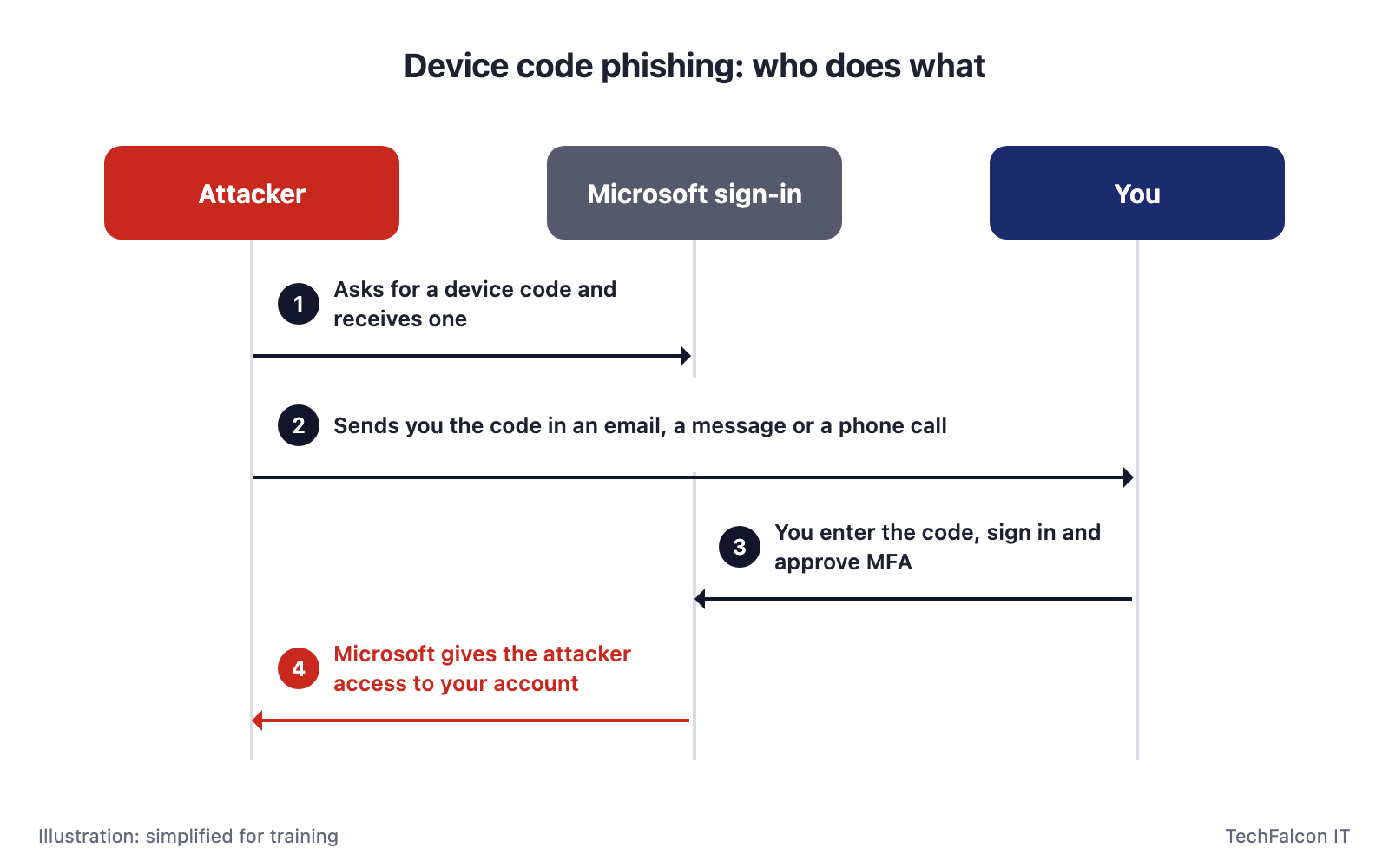
The attacker simply plays the part of the device.
- The attacker starts a sign-in and gets a code. They ask Microsoft for a device code, exactly as a smart TV would. Microsoft issues one, valid for about 15 minutes.
- They send you the code with a reason to use it. Typical lures are a Teams meeting invitation, a shared document, a DocuSign request, a voicemail notification or a payroll notice. Some attackers phone staff directly, posing as IT support.
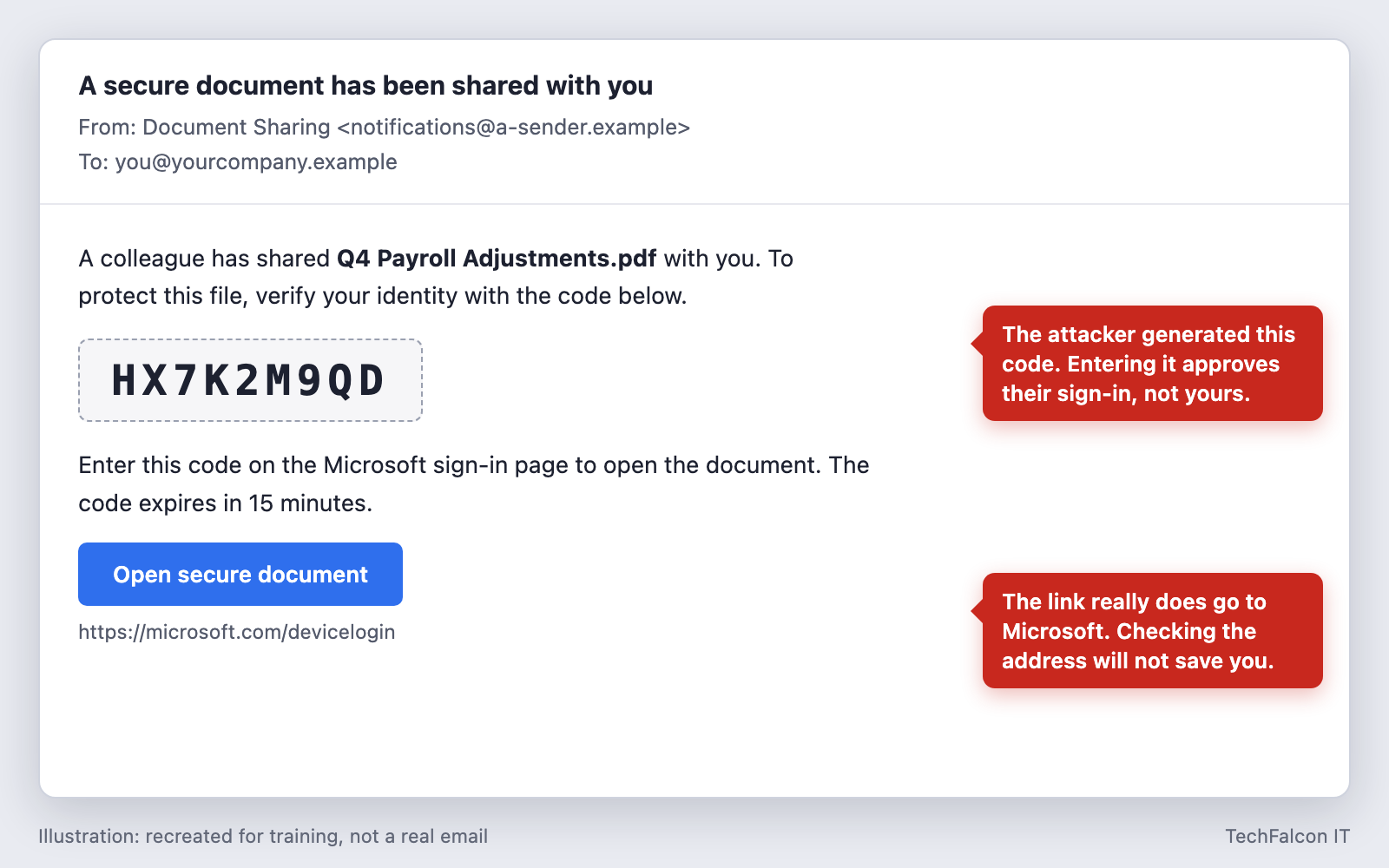
- You enter the code on Microsoft’s real page. The address is genuine, so nothing looks wrong. You type your password and approve MFA as usual.
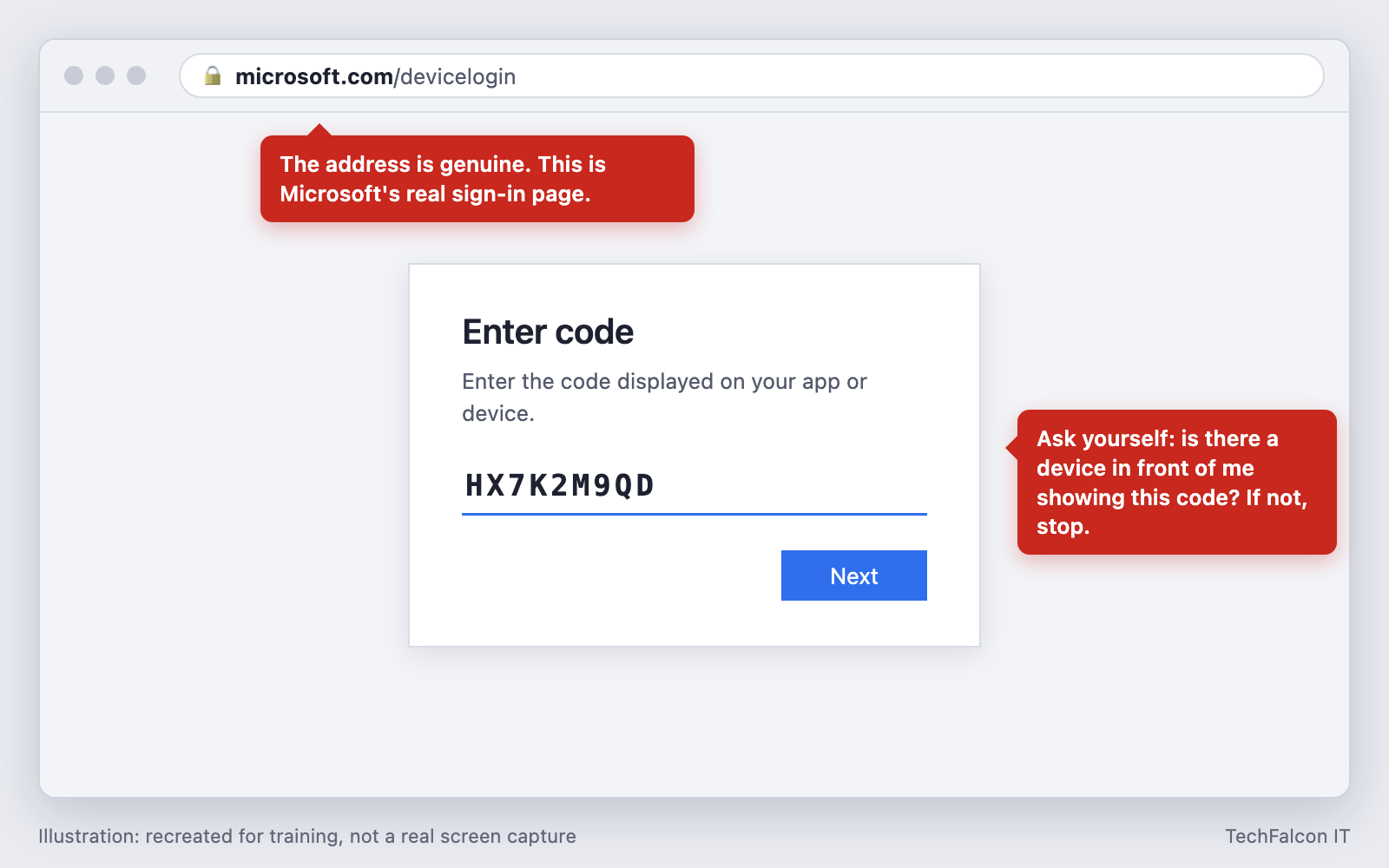
- Microsoft gives the access to the attacker. The sign-in you just approved was theirs. Their computer receives tokens for your account, with no password and no further MFA needed.
- They stay in. The tokens keep working after you close the browser. Attackers read and search email, download files, send phishing from your account to your colleagues and clients, and sometimes register their own device to make the access last.
Why MFA and link-checking do not stop it
- There is no fake website. Email filters and browser warnings look for malicious links, and the link here points to Microsoft.
- You complete MFA yourself. The attacker does not need to steal or intercept anything. Security researchers report that this holds even for passkeys and security keys, because the sign-in is genuine.
- The password is never stolen, so changing it afterwards does not, on its own, remove the attacker.
How common is it?
- February 2025: Microsoft disclosed a campaign, active since August 2024, by a group it tracks as Storm-2372, using fake Teams invitations against governments and other organizations.
- December 2025: Proofpoint reported that device code phishing had become widespread, including high-volume criminal groups and not only state-backed ones.
- March 2026: Huntress reported a campaign targeting more than 340 organizations in five countries, including Canada. Affected sectors included construction, non-profits, real estate, manufacturing, financial services, healthcare, legal and government.
- April 2026: Microsoft said it was seeing 10 to 15 new campaigns every 24 hours, with hundreds of accounts compromised daily and a consistent focus on finance staff.
- May 2026: the FBI issued a public warning about Kali365, a ready-made kit sold to criminals that automates the whole attack.
In the cases Microsoft described, attackers created inbox rules to forward messages with words such as “payroll” or “invoice” in the subject. That is the groundwork for invoice and payroll fraud.
Warning signs to teach your staff
One rule covers it:
Only enter a sign-in code that you generated yourself, on a device in front of you, moments ago.
Stop and report if:
- An email, text, Teams message or phone call gives you a code and asks you to enter it at
microsoft.com/devicelogin - You are asked to enter a code to open a document, join a meeting, hear a voicemail or “verify” your account
- “IT support” calls and reads you a code to type in
- The Microsoft page says you are signing in to an app or device you did not just set up
A genuine code always comes from a screen you are looking at, not from another person.
The fix: block device code flow
Microsoft’s own guidance is to block device code flow wherever possible, and it describes the method as rarely used by customers but frequently used by attackers. For most small and mid-sized businesses, that means blocking it for everyone.
In the Microsoft Entra admin center, under Entra ID > Conditional Access > Policies, create a policy with these settings:
| Setting | Value |
|---|---|
| Users | All users. Exclude your emergency access (break-glass) accounts |
| Target resources | All resources |
| Conditions > Authentication flows | Device code flow |
| Grant | Block access |
| Enable policy | Report-only first, then On |
Three practical notes:
- Check whether the policy already exists. Microsoft has been adding a Microsoft-managed policy named Block device code flow to eligible tenants. Look for it in your policy list and confirm it is switched On, not left in report-only.
- Run report-only first. Leave the policy in report-only mode and review the sign-in logs for genuine device code sign-ins before enforcing it. Meeting-room systems such as Microsoft Teams Rooms are the most common legitimate use, and Microsoft publishes guidance for making a narrow exception for them.
- Check your licence. Conditional Access is included in Microsoft 365 Business Premium and in Microsoft Entra ID P1 and P2. It is not part of Business Basic or Business Standard.
Other controls that help
- Require managed, compliant devices for access to Microsoft 365, so tokens issued to an unknown computer are far less useful.
- Alert on new device registrations and new inbox rules. Both are common first moves after a takeover.
- Monitor identity activity around the clock. Unusual sign-ins need someone to act on them at 3 a.m., not on Monday morning.
- Train for the phone call as well as the email. Staff should know that IT will never read them a code to enter.
- Agree a callback rule for payment changes. If a mailbox is taken over, it stops the invoice fraud that usually follows.
What to do if someone entered a code
Act quickly, and make sure staff know they will not be in trouble for reporting it.
- Revoke the user’s sessions. This invalidates the attacker’s tokens. A password reset alone does not.
- Reset the password, then have the user sign in again with MFA.
- Review registered devices and MFA methods for the account, and remove anything the user does not recognise.
- Check the mailbox for new inbox rules, forwarding addresses and delegates.
- Review sign-in logs for device code sign-ins and for access from unfamiliar locations, to establish when the attacker got in and what they opened.
- Check what was sent from the account. Warn colleagues and clients if phishing went out in the user’s name.
- Assess whether personal information was exposed. A compromised mailbox often contains client or employee data. See our guide to breach notification rules in Alberta.
Where to start
Ask whoever manages your Microsoft 365 one question: is device code flow blocked in our tenant? If the answer is no, or nobody is sure, that is the first thing to fix.
This attack has a close relative that targets the computer instead of the account: see our guide to fake CAPTCHA (ClickFix) attacks.
How TechFalcon IT can help
- Check and close the gap. As part of Cloud & Microsoft 365 tenant security hardening, we review your Conditional Access policies, including whether device code flow is blocked, along with multi-factor authentication, legacy sign-in and admin roles. You get a security baseline report, before and after.
- Watch for the takeover. Managed Detection & Response monitors endpoint, network and cloud activity 24 hours a day, and analysts act on a threat instead of only sending a ticket.
- Prepare your staff. Security Awareness Training combines short sessions on social engineering with realistic phishing simulations, and reports who clicked and who reported.
- Respond if it has already happened. Our Incident Response team triages and contains the threat, then monitors for 45 days afterwards. If you only suspect a mailbox was accessed, a Compromise Assessment tells you for certain.
Not sure whether device code flow is blocked in your tenant? Contact us and we will help you find out.
Sources
- Microsoft Threat Intelligence, Storm-2372 conducts device code phishing campaign (February 2025)
- Microsoft Learn, Block authentication flows with Conditional Access policy
- Microsoft Learn, Microsoft-managed Conditional Access policies
- Proofpoint, Access granted: phishing with device code authorization for account takeover (December 2025)
- BleepingComputer, Hackers target Microsoft Entra accounts in device code vishing attacks (February 2026)
- The Hacker News, Device Code Phishing Hits 340+ Microsoft 365 Orgs Across Five Countries via OAuth Abuse, reporting research by Huntress (March 2026)
- The Register, Hundreds compromised daily in Microsoft device code phishes (April 2026)
- FBI Internet Crime Complaint Center, Kali365 Phishing-as-a-Service Kit Hijacks Microsoft 365 Access Tokens (May 2026)
- The Hacker News, 6 Reasons Why Device Code Phishing is the Fastest-Growing Threat of 2026, contributed by Push Security (July 2026)
Frequently asked questions
Does MFA protect against device code phishing?
No. The victim completes MFA themselves on Microsoft's real sign-in page, and the resulting access goes to the attacker. That is true for authenticator apps and text codes, and security researchers report it also applies to passkeys and security keys, because the sign-in itself is genuine. The reliable defence is to block the device code sign-in method.
How do I block device code flow in Microsoft 365?
Create a Conditional Access policy in the Microsoft Entra admin center: include all users, exclude your emergency access accounts, target all resources, set the Authentication flows condition to Device code flow, and choose Block access. Run it in report-only mode first to find any legitimate use. Conditional Access requires Microsoft 365 Business Premium or a Microsoft Entra ID P1 or P2 licence.
What is a device code used for legitimately?
It lets you sign in on a device that has no keyboard or browser, such as a smart TV, a meeting-room system or a printer. The device shows a short code, and you enter it at microsoft.com/devicelogin on your phone or computer. Microsoft says the method is rarely used by customers but frequently used by attackers.
Someone on our team entered a code. Is changing their password enough?
No. The attacker holds sign-in tokens, not the password. Revoke all of the user's sessions, then reset the password, remove any device or MFA method the user does not recognise, and check the mailbox for new forwarding or inbox rules.
How we can help
Cloud & Microsoft 365
Migrations, secure Microsoft 365 setup and cloud backup, done properly.
Learn more →Managed Detection & Response (MDR)
24/7 threat hunting and response by analysts who act, not just alert.
Learn more →Security Awareness Training
Phishing simulations and training that change staff behaviour.
Learn more →Incident Response
Ransomware or breach? Rapid containment plus a compromise assessment.
Learn more →