
Fake CAPTCHA (ClickFix) attacks: what they are and how to stop them
You click a search result, and before the page loads you see a familiar box: “Verify you are human.” You click it. Instead of a tick, you get three steps:
- Press Windows + R
- Press Ctrl + V
- Press Enter
It takes two seconds, and it looks like Cloudflare or Google reCAPTCHA. It is neither. You have just installed malware on your own computer.
This is a fake CAPTCHA attack, known in the security industry as ClickFix. It is now one of the most common ways attackers get into business computers.
How a fake CAPTCHA attack works
- You land on the page. The link comes from a phishing email, a malicious advert, a search result, or a legitimate website that has been hacked.
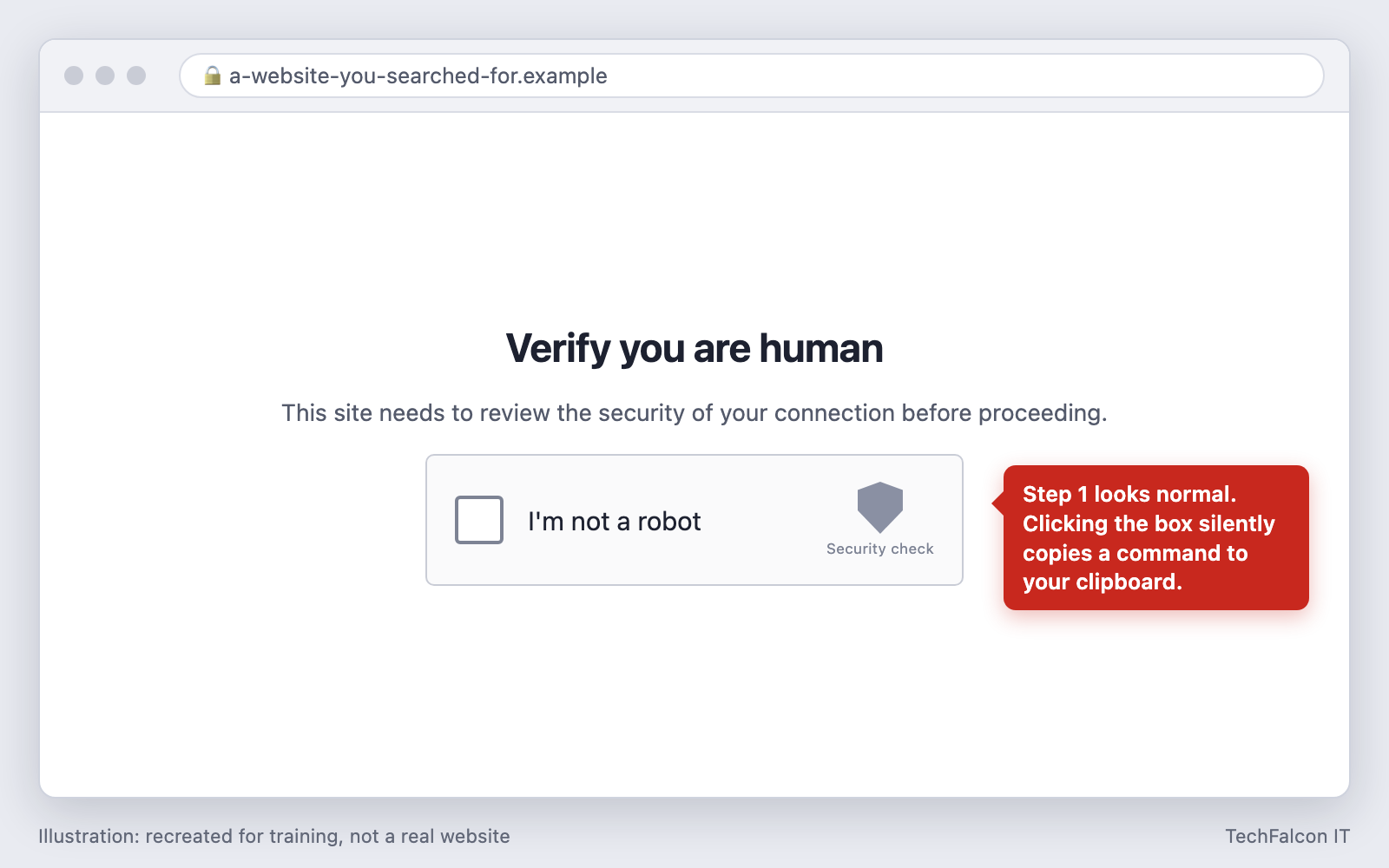
- The page copies a command to your clipboard. This happens silently when you click the “I’m not a robot” box. You never see the command.
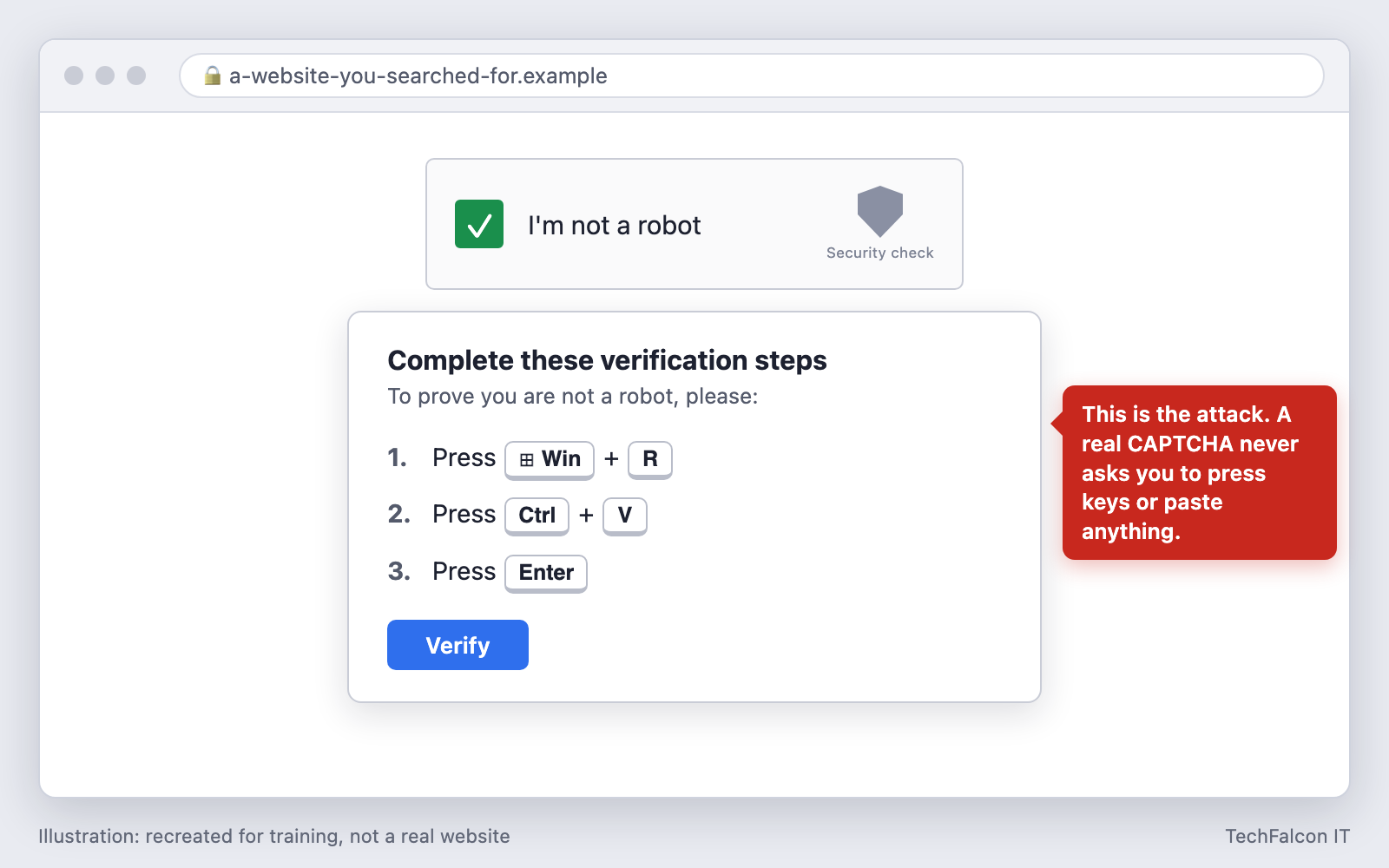
- The page tells you to paste and run it. Windows+R opens the Run dialog, Ctrl+V pastes the hidden command, and Enter runs it.
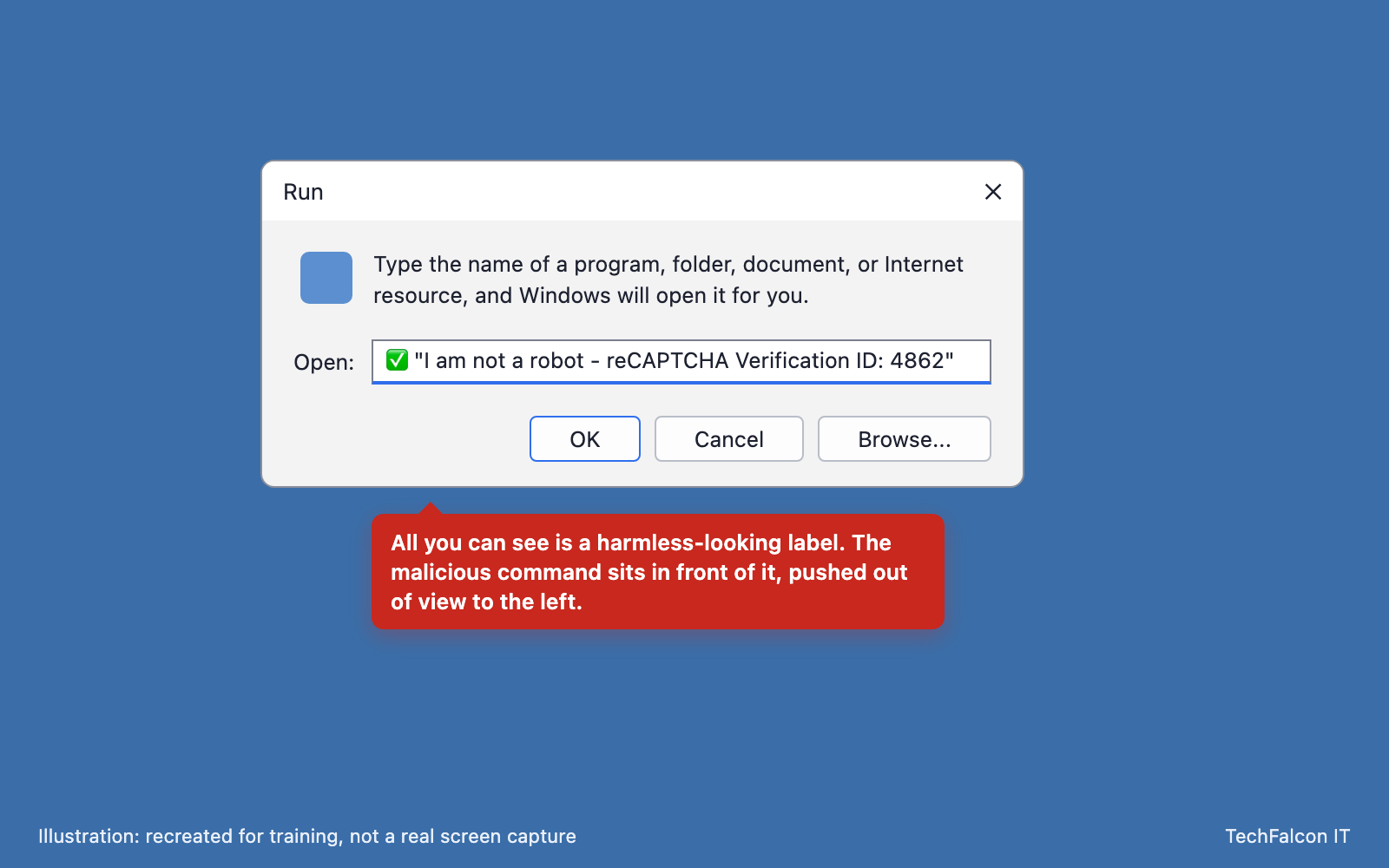
- What you paste looks harmless. The visible end of the pasted text often reads like a confirmation, such as “I am not a robot – reCAPTCHA Verification ID”, with the malicious part pushed out of view.
- Malware downloads in the background. The command uses tools built into Windows, such as PowerShell, so no window appears and nothing looks wrong. The page may even show a green tick.
The trick works because you ran the command. There was no attachment to scan and no download to block, and people have been trained for years to click through CAPTCHAs without thinking.
How common is it?
- ESET reported that its ClickFix detections rose 517% between the second half of 2024 and the first half of 2025, making it the second most common attack vector after phishing and nearly 8% of all attacks it blocked.
- Microsoft’s 2025 Digital Defense Report says ClickFix was the most common way attackers first got in across the incidents its Defender Experts team notified customers about, at 47%.
- Microsoft also says these campaigns target thousands of business and home devices around the world every day.
It is on legitimate websites too
“Only visit sites you trust” does not protect you here. Attackers break into ordinary websites and inject the fake CAPTCHA, so real visitors to a real site see it.
- In May 2026, more than 700 websites built on the Ghost publishing platform, including education and technology company sites, were hijacked through a known vulnerability and used to show fake CAPTCHA prompts to visitors.
- In September 2026, researchers reported about 17,000 web addresses serving fake Cloudflare verification pages, many of them on compromised WordPress sites.
What the attacker gets
The most common payload is an infostealer, such as Lumma or Vidar on Windows and Atomic macOS Stealer (AMOS) on Mac. Within seconds it collects:
- Passwords saved in the browser
- Session cookies, which can let an attacker reuse a login that has already passed multi-factor authentication
- Cryptocurrency wallets, and in some campaigns VPN configurations
Stolen logins are sold on to other criminals, who use them to get into company email, Microsoft 365 and remote access systems. Other campaigns install remote access tools that give the attacker hands-on control of the computer.
It can also be the first step of a ransomware attack. In July 2025 the FBI and CISA warned that the Interlock ransomware group uses fake CAPTCHAs to gain initial access to businesses in North America and Europe.
Warning signs to teach your staff
One rule covers almost every version:
A real CAPTCHA never asks you to do anything outside the browser.
Close the tab if a web page asks you to:
- Press Windows + R, or open PowerShell, Command Prompt or Terminal
- Press Ctrl + V (or Cmd + V) to paste something you did not copy yourself
- Paste a “file path” into the File Explorer address bar (a newer variant called FileFix)
- Type your Mac password into Terminal
- Follow steps to “fix” an error, update your browser, or view a document
The same trick appears with different costumes: fake browser updates, fake “document failed to load” errors, fake Windows Update screens and fake meeting-join problems. The instruction to paste and run something is the constant.
Controls that stop it
Training helps, but someone will eventually have a bad day. These technical controls reduce the damage:
- Restrict the Run dialog and scripting tools. Most office staff never use them. The Run dialog can be removed with Group Policy or Intune (Remove Run menu from Start Menu), and PowerShell can be limited for standard users. This does not block every variant, so treat it as one layer.
- Turn on attack surface reduction rules in Microsoft Defender, especially the rules that block obfuscated scripts and stop scripts from launching downloaded programs.
- Use endpoint detection and response with 24/7 monitoring. A browser session that leads to a hidden PowerShell download is exactly the behaviour EDR is built to catch, and somebody needs to be watching when it fires.
- Filter web and DNS traffic to block known malicious sites and the servers the malware downloads from.
- Shorten session lifetimes and use conditional access in Microsoft 365, so a stolen cookie is useful for less time and from fewer places.
- Stop staff saving work passwords in the browser. A business password manager keeps them out of the place infostealers look first.
- Enable PowerShell script block logging, so there is a record to investigate if something does run.
- Keep your own website patched. If you run WordPress or another content management system, an unpatched plugin can turn your site into the one showing fake CAPTCHAs to your clients.
What to do if someone ran the command
Speed matters more than blame. Make sure staff know they will not be in trouble for reporting it.
- Disconnect the computer from the network (unplug the cable or turn off Wi-Fi) and stop using it. Do not just restart it.
- Tell your IT provider straight away.
- From a different, clean device, change passwords, starting with email, Microsoft 365, banking and any password manager. Then sign out of all active sessions so stolen cookies stop working.
- Have the computer investigated. Windows keeps a history of Run dialog commands, which helps confirm what was run and when. The device may need to be rebuilt.
- Review sign-in logs for the affected accounts, looking for logins from unfamiliar locations, new mail-forwarding rules and new MFA devices.
- Assess whether personal information was exposed. If client, patient or employee data was accessible from that computer or those accounts, you may have notification duties. See our guide to breach notification rules in Alberta.
Where to start
If your staff have never seen a fake CAPTCHA, show them this article and the one rule above. For ongoing practice, our Security Awareness Training combines short training sessions on social engineering with realistic phishing simulations. Managed Detection & Response puts analysts behind your endpoints around the clock, and Managed IT covers the endpoint protection, patching and email security underneath.
A related attack goes after the Microsoft 365 account instead of the computer: see our guide to device code phishing.
If someone has already run one of these commands, treat it as an incident and contact our Incident Response team.
Sources
- Microsoft Threat Intelligence, Think before you ClickFix: Analyzing the ClickFix social engineering technique (August 2025)
- Infosecurity Magazine, ClickFix Attacks Surge 517% in 2025, reporting the ESET Threat Report H1 2025 (June 2025)
- CISA and FBI, #StopRansomware: Interlock (July 2025)
- The Hacker News, ClickFix Attacks Expand Using Fake CAPTCHAs, Microsoft Scripts, and Trusted Web Services (January 2026)
- Malwarebytes, 700+ education and tech websites hijacked in huge ClickFix malware campaign (May 2026)
- The Hacker News, 17,000 URLs reveal how ClickFix turns, reporting research by CTM360 (September 2026)
Frequently asked questions
How can I tell a fake CAPTCHA from a real one?
A real CAPTCHA only asks you to do something inside the web page: tick a box, pick images or solve a puzzle. A fake one asks you to do something on your computer, such as pressing Windows+R, opening PowerShell or Terminal, or pasting with Ctrl+V. If a web page gives you keyboard steps to 'verify' yourself, close the tab.
I pasted and ran the command. What should I do?
Disconnect the computer from the network and tell your IT provider immediately. Do not keep working on it. From a different device, change your passwords, starting with email, banking and Microsoft 365, and sign out of all sessions. Assume every password and login cookie saved in that browser has been stolen.
Will antivirus or MFA stop a fake CAPTCHA attack?
Not reliably on their own. The command is run by the user with built-in Windows tools, and the malware often runs only in memory, so basic antivirus may see nothing. MFA still matters, but infostealers take session cookies, which can let an attacker reuse a login that has already passed MFA. Endpoint detection and response with 24/7 monitoring is far more likely to catch it.
Are Macs affected?
Yes. The Mac version asks you to open Terminal and paste a command, and often asks for your Mac password. It typically installs Atomic macOS Stealer (AMOS), which takes browser passwords, Keychain data and cryptocurrency wallets.
How we can help
Security Awareness Training
Phishing simulations and training that change staff behaviour.
Learn more →Managed Detection & Response (MDR)
24/7 threat hunting and response by analysts who act, not just alert.
Learn more →Incident Response
Ransomware or breach? Rapid containment plus a compromise assessment.
Learn more →Managed IT Services
Help desk, monitoring, patching, servers and networks, for a flat monthly fee.
Learn more →